Every "best keyword research tools" article on the internet is a thinly disguised affiliate page. Fifteen tools. The same fifteen tools. The same screenshots of Semrush's Keyword Magic dashboard. The same boilerplate paragraphs about search volume, keyword difficulty, and CPC. Affiliate links neatly tucked under each entry.
The problem isn't that these articles exist. The problem is that they answer the wrong question. The real question isn't "which keyword research tool is best?" — it's "how do I find keywords that will actually bring customers to my business?" No tool answers that. The tool is an input. The process is what decides whether the input becomes revenue or wasted blog posts.
So this article does two things differently. First, it walks through the keyword research process that actually drives pipeline — the boring, unsexy part nobody writes about because it doesn't earn affiliate commission. Second, it tells you which tools fit which step, which ones to pay for, and which ones to walk past.
If you wanted a 15-tool comparison table with star ratings, this isn't it. If you want to leave with a real keyword strategy and the cheapest stack of tools to actually run it, keep reading.
What Keyword Research Actually Is
Keyword research is the process of identifying the search queries your potential customers use, scoring them by commercial value, and mapping them to content or pages that match the searcher's intent at each stage of their buying journey.
It is not the same as "finding high-volume keywords." Volume is one input. Intent, competition, and commercial fit are equally important — and in most cases, more important than volume alone.
The reason this distinction matters: most teams treat keyword research as a hunting expedition for high-volume terms. They open a tool, type a topic, sort by volume, pick the top ten, and start writing. That's not research. That's keyword shopping. And it's the reason so many content programs hit their traffic targets every month and miss their pipeline targets every month.
The Mistake Almost Everyone Makes
At Emvigo, I've audited content programs where the team was celebrating record traffic months and the sales team hadn't seen a meaningful inbound lead in a quarter. Both were true at the same time. The cause was always the same: keywords picked for volume, not for whether the searcher was actually a buyer.
Here's how the failure mode looks in practice. A team picks a keyword with 4,400 monthly searches and "manageable" difficulty. They write a solid blog post. It ranks. Traffic flows in — 800 visitors a month. The dashboard looks healthy.
Six months later, that page has produced zero qualified leads. Why? Because the people searching for that keyword were students writing assignments, competitors doing research, and curious passers-by. None of them had a budget. None of them had a problem you could solve. The volume was real. The intent was wrong.
Search volume tells you how many people search. It does not tell you who those people are, why they're searching, or whether any of them will buy from you. A keyword with 50 monthly searches from active buyers will generate more pipeline than a keyword with 5,000 monthly searches from researchers and tire-kickers. Volume without intent is vanity data.
The shift from volume-first to intent-first keyword research is the single biggest improvement most teams can make to their content programs. And it costs nothing — it's a process change, not a tool change.
The 5-Step Keyword Research Process That Actually Works
This is the methodology I'd use whether the budget was ₹0 or ₹50,000 a month. The tools change at different budgets. The process doesn't.
Step 1: Start With the Commercial Outcome (Before You Open Any Tool)
Before you research a single keyword, write down the business outcome the content needs to drive. Pipeline? Email signups? Product trials? Local appointment bookings? A specific number of inbound enquiries per month?
This step takes ten minutes. Most teams skip it. It's also the step that decides whether everything that follows is useful or wasted.
If the outcome is "more demo bookings for a B2B SaaS product," your target keywords look like [product category] + reviews / comparison / alternative / pricing / best. If the outcome is "more local consultations," your target keywords look like [service] + [city] or how to [problem the service solves]. If the outcome is "build an email list," your target keywords look broader and more informational.
Different outcomes need different keywords need different content. The tool cannot make this decision for you.
Step 2: Mine Your Customers, Not the Internet
The richest keyword source isn't a research tool. It's three places almost nobody checks:
Your sales calls. What words do prospects use to describe their problem? What alternatives do they compare you to? What objections come up repeatedly? Every recorded sales call is keyword gold. Pull six recent calls, listen on 1.5x speed, write down every problem-phrase you hear.
Your support tickets. The exact phrasing customers use when something goes wrong is the exact phrasing they'll use when searching for a solution to that problem on Google. Search ticket history for the most common 20 issues. You'll find your strongest informational keywords here.
Your customer reviews. Pull every G2, Trustpilot, Capterra, or Google Business review for your brand and your top 3 competitors. The language is the keyword research. Look for the verbs and adjectives buyers use. Those phrases convert because they came from buyers.
This step costs zero rupees, takes about three hours, and produces better seed keywords than any tool will give you. Because it reflects how your actual buyers describe their world, not how SEO bloggers think they do.
Step 3: Expand the Seed List With a Tool
Now — and only now — you open a keyword research tool. The seed keywords from Step 2 are the input. The tool's job is to expand each seed into related queries, long-tail variations, and questions people are actually asking.
This is what tools are genuinely good for. This is also where every other article on the SERP spends 100% of its word count.
A good tool will give you volume estimates, keyword difficulty scores, related queries, and "people also ask" expansions. Use these. But treat them as data points for your decision, not as the decision itself. Tool list comes later in this post.
Step 4: Filter by Intent, Not Volume
For each keyword on your expanded list, classify it by intent:
- Informational — the searcher wants to learn ("what is keyword research")
- Commercial investigation — the searcher is comparing options ("best keyword research tool")
- Transactional — the searcher wants to convert ("Semrush free trial," "Ahrefs pricing")
- Navigational — the searcher is heading to a specific brand ("semrush login")
Then ask: does the intent of this keyword match the commercial outcome from Step 1? If yes, keep it. If no, drop it — even if volume is high. Especially if volume is high.
This is where most keyword research programs collapse. A team writes informational content while expecting transactional outcomes. ("We published a 3,000-word guide and nobody bought.") Or transactional content while expecting awareness reach. ("We wrote a comparison page and nobody arrived ready to buy.") Intent-keyword mismatch is the single biggest reason content programs underperform.
Step 5: Map Keywords to Buyer Journey Stages
The final step: organise the keywords you kept into a content map by buyer journey stage.
- Awareness = informational keywords. Buyer doesn't yet know they have the problem you solve.
- Consideration = commercial investigation. Buyer knows the problem, is comparing solutions.
- Decision = transactional or product-specific. Buyer is choosing between you and 2–3 alternatives.
A complete content programme covers all three stages. Most teams over-index on awareness ("we'll do thought leadership"), produce zero consideration or decision content, then wonder why their traffic doesn't convert. It doesn't convert because the content was written for the part of the journey furthest from the purchase.
A keyword research strategy isn't a spreadsheet of keywords. It's a map of which keywords belong to which stage of your buyer's journey, and which content piece each one points to. Without that map, you're producing content into a void. [/DAB]
The Tools — Organised by When You Use Them
I've grouped these by the step in the process they fit, not by "free vs paid." A tool's price tier matters less than whether it's the right tool for what you're trying to do at that moment.
For Customer Mining (Step 2) — Free + Already in Your Stack
- Gong, Chorus, or Fathom (if you record sales calls): export transcripts and search for problem-language.
- Help Scout, Zendesk, or Intercom: search ticket history for common phrasings.
- G2, Trustpilot, Google Business: read your own and your competitors' reviews.
You don't pay extra for these. You just have to actually use them. Most teams don't.
For Seed Expansion (Step 3) — Where Tool Choice Matters
This is where the "best keyword research tools" articles spend all their time. Honest take on the main contenders:
Ahrefs Keywords Explorer. The benchmark. Largest dataset, strong volume accuracy, deep "questions" filter, parent topic clustering. Plans start around $129/month. Worth it if keyword research is a weekly activity, not a quarterly one.
Semrush Keyword Magic Tool. Comparable database, slightly better intent classification, integrated with PPC research. Starts around $139/month. Pick this over Ahrefs only if you're running paid media in parallel.
Ubersuggest. Cheapest of the "real" tools. Lifetime pricing options are tempting (one-time payment instead of monthly). Data quality is okay, not great. Reasonable if you're solo and the alternative is paying $129/month forever.
Mangools KWFinder. Solid mid-tier option. Cleaner interface than the big two, decent data, plans from $29/month. Probably the right pick for SMBs that don't need a full SEO suite.
Google Keyword Planner. Free, accurate for paid-ad context, weak for SEO. The volume buckets are ranges so wide they're nearly useless ("1K-10K"). Use this for PPC research, not SEO planning.
For Long-Tail and Question Research — Mostly Free
- AnswerThePublic. Visualises the questions people ask around a seed keyword. Free tier limited but usable.
- AlsoAsked. Tree view of "people also ask" expansions. Free tier covers occasional use.
- Reddit search. People ask questions in plain language on Reddit. The "I'm thinking of buying X, anyone use it?" threads are pure intent data — and they're indexed.
- Quora. Less useful than five years ago, still has signal in niche industries.
For Free Volume and Intent Data (The Underused Stack)
- Google Search Console. The most underused keyword tool on the planet. It tells you exactly which queries are bringing people to your site, your current ranking position, and the click-through rate. If your site has any traffic at all, GSC gives you keyword data no third-party tool can match — because it comes directly from Google.
- Google Trends. Free, official, shows seasonality and rising queries. Essential for any keyword that might be seasonal or trending.
- Bing Webmaster Tools. The free Microsoft equivalent of GSC. Underrated. Has keyword data Google doesn't show you.
For AI Search Keyword Research — The 2026 Differentiator
Here's the section nobody else on the SERP is writing about.
In 2026, a meaningful chunk of search activity has moved to ChatGPT, Perplexity, Claude, and Google AI Overviews. The "keywords" used inside those tools aren't keywords in the traditional sense — they're prompts. Conversational. Multi-sentence. Often containing context the user would never have typed into a Google search box.
The keyword "best CRM" on Google becomes "I'm a 5-person services agency looking for a CRM that integrates with Calendly and isn't overpriced — what would you recommend?" inside ChatGPT.
This changes keyword research in two important ways:
- You need to research the prompts people use in AI tools, not just the keywords they type into Google.
- You need to monitor whether your content is being cited in AI answers — because if it is, you're capturing demand without anyone touching a Google results page.
Answer Engine Optimisation is the strategic layer that addresses both. The tools below are early-stage but real:
- Profound, Otterly, Athena — track brand mentions and citations across ChatGPT, Perplexity, and AI Overviews. Pricing varies. Niche but growing fast.
- Manual prompt research. Pick your 10 most commercially important queries. Run them in ChatGPT and Perplexity once a month. Screenshot the answers and citations. Crude. Free. Works.
There is no "Ahrefs for AI search" yet that does everything well. Anyone telling you otherwise is selling you a beta product. But ignoring this entire layer is the bigger mistake. Brands that started measuring AI citations in 2025 are now 18 months ahead of brands that haven't started.
What I'd Actually Buy at Three Budgets
No fluff. Real picks for three real budgets.
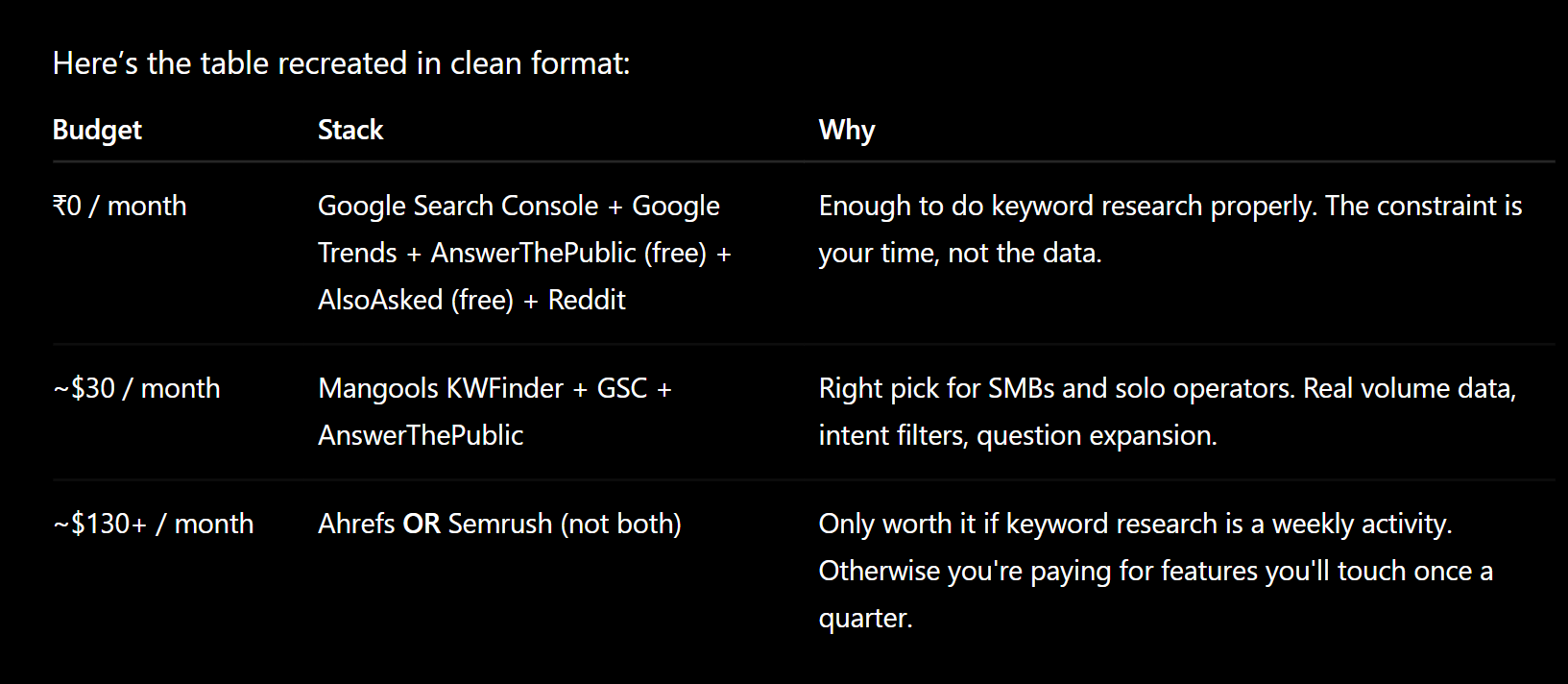
Add an AI-search monitoring tool only after you have a real reason to — i.e., you're seeing competitors get cited in ChatGPT and you want to be cited too.
Three rules to save you money:
- Don't pay for both Ahrefs and Semrush. Pick one.
- Don't subscribe annually to anything before testing it for a month.
- Don't buy any tool whose features you can't recall off the top of your head — you won't use them.
The 2026 Twist Most Teams Are Missing
In my work at Emvigo, I've watched keyword research evolve in real time over the last 18 months. Three years ago, "research" meant typing a seed into Ahrefs and ranking the suggestions by monthly volume. Now you have to ask a different question: "what is someone asking about this topic in ChatGPT, not just searching for in Google?" The questions are longer, more specific, more buyer-stage-aware. And the brands getting cited in AI answers aren't always the ones with the biggest volume — they're the ones with the cleanest, most extractable content on the right narrow topics.
This shifts the entire model. Old keyword research optimised for traffic. New keyword research optimises for being chosen — chosen by Google to rank, and chosen by AI tools to cite.
The tools haven't caught up yet. The methodology has.
If you're still doing keyword research the 2019 way — type seed into tool, sort by volume, write blog post — you're going to keep losing visibility to brands that figured out the new shape. Not because the new tools are better. Because the new questions are different.
Summary: The Short Version
Keyword research is a process, not a tool. Start with the commercial outcome. Mine seed keywords from your own customers, sales calls, and support tickets — that's the step nobody writes about and it's the most valuable. Then expand with a tool, filter by intent (not volume), and map keywords to buyer-journey stages. For tools: GSC + AnswerThePublic + Trends is enough at zero budget. Mangools KWFinder is the sweet spot at $29/month. Ahrefs or Semrush only pays off if keyword research is a weekly activity. And in 2026, add AI search to your keyword research — the prompts people use in ChatGPT are different from the keywords they type in Google, and the brands that figure this out first will compound a real advantage.
The brands that win at keyword research in 2026 aren't the ones with the biggest tool budgets. They're the ones who do Steps 1, 2, 4, and 5 properly — the steps almost everyone skips. The tool you choose for Step 3 matters far less than whether you did the other four steps at all.
Want a keyword research audit that tells you which of your current keywords are actually driving pipeline — and which are wasting your content team's time?
We run keyword + content + AI-citation audits for businesses serious about ranking in 2026's search landscape — both Google and the AI tools that increasingly sit between buyers and your website.
FAQ
What's the best keyword research tool for beginners? For someone starting out with no budget, the best stack is Google Search Console (free, from Google directly), Google Trends, and AnswerThePublic's free tier. That covers volume directionality, seasonality, and question-based long-tail research. Move to a paid tool like Mangools KWFinder ($29/month) once you've outgrown what free tools can do.
Is keyword research still relevant in 2026 with AI search? Yes — more relevant, not less. The format has shifted (people use longer, conversational prompts in AI tools), but the underlying need is the same: understanding what your buyers are searching for and matching content to that search intent. The brands being cited in ChatGPT and Perplexity today are mostly the ones who did proper keyword research before AI search existed.
How often should I do keyword research? A full strategic review once or twice a year. Light ongoing research weekly — checking what your existing pages rank for, monitoring competitor movements, and adding new question-based keywords as they emerge. Don't try to "redo" keyword research from scratch every month; that's churn, not strategy.
Do I need a paid tool, or can I get by with free tools? For small sites with limited content velocity, free tools are genuinely enough. The bottleneck at that stage is time, not data. Once you're publishing more than four pieces of content a month, or doing competitor analysis, or running a paid-search programme alongside SEO, a paid tool starts paying for itself. Below that volume, free tools cover the basics.
What's the most underrated keyword research tool? Google Search Console. It's free, official, and shows you the exact queries already bringing people to your site — including queries no third-party tool will surface because the volume is too low to track. Most teams check it once a month at best. It should be a weekly habit.
How is keyword research for AI search different from Google? AI search "keywords" are usually long, conversational prompts that include context (the searcher's situation, constraints, preferences) the same person would never include in a Google query. Researching them requires monitoring what people ask in ChatGPT, Perplexity, Claude, and Google AI Overviews — not just what they type into Google. Tools like Profound and Otterly help track citations, but most of this work is currently manual.